|
|||||||||||||||||||||||||||||||||||||||||||||||||||||||||||||||||||||||||||||||||||||||||||||||
|
Best modification and
lowest price Guaranteed.
Panasonic DMP-BD80K Region
Free DVD Player.
|
||||||||||||||||||||||||||||||||||||||||||||||||||||||||||||||||||||||||||||||||||||||||||||||


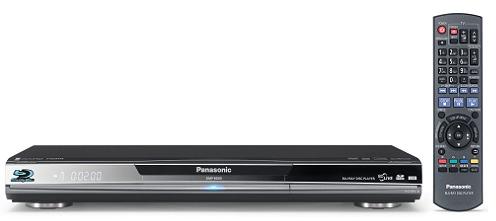


Original movie quality in your living room
|
How "BD-Live" expands the
movie-watching experience
Panasonic has been a leader in Blu-ray development since the
format's launch. The key addition is an Ethernet port,
which lets you connect the player directly to the Internet
to access bonus material available on some Blu-ray movies. You can stream this content to your HDTV via a
broadband connection, and even save it to removable SD
memory cards.
Picture quality that will please
even demanding videophiles
The 'BD80's stunning picture is a result of Panasonic's
exclusive video processing. It samples over 15 billion
pixels per second to create a detailed picture with
lifelike textures, and uses 16-level motion detection to
ensure on-screen movement stays blur-free. Special
processing eliminates jagged edges on diagonal lines,
for smooth, realistic contours. If your HDTV accepts
1080p/24 video, the 'BD80's 1080p/24 output mode will
provide the sharpest, most filmlike picture on Blu-ray
movies.
Complete the high-def experience
with the latest high-res surround sound formats
If you own a newer home theater receiver with advanced
surround decoding, experiencing the state-of-the-art
sound on Blu-ray discs is easy. Simply connect the
DMP-BD80 to your receiver via HDMI for up to 7.1
channels of sound from Blu-ray movies with Dolby®
Digital Plus, Dolby TrueHD, DTS-HD™, or DTS-HD Master
Audio soundtracks. Dolby TrueHD and DTS-HD Master Audio
use "lossless" compression to deliver detailed sound
that's identical to the movie studio's original master.
And if your A/V receiver lacks HDMI, don't worry. This
player's built-in decoding and 5.1 analog outputs make
these high-res formats accessible to any receiver with a
5.1 input.
Disc Compatibility: The DMP-BD80k Region Free is playback compatible with many disc types which include:
-
Play any Region Standard dvd movie from 0,1,2,3,4,5,6,7,8
-
Play any region or zone Blu-Ray dvd movie A, B, or C
-
BD-ROM Playback: BD-Live
-
BD-RE / BD-RE DL: BD-MV (BD-RE version3), BDAV (SESF), JPEG (HD)
-
BD-R/BD-R DL: BD-MV (BD-R version2), BDAV (SESF)
-
DVD Playback: DVD-Video
-
DVD-RAM Playback: DVD-VR, JPEG (HD), AVCHD
-
DVD-R/-RW/-R(DL) Playback: DVD Video, DVD-VR, AVCHD, DivX® (DVD-R/-R DL only)
-
+R/+R(DL)/+RW Playback: DVD-VR, AVCHD
-
CD, CD-R/-RW Playback: CD-DA, DivX® (CD-R/-RW only), MP3 3 (CD-R/-RW only), JPEG (HD) (CD-R/-RW only)
-
SD Memory Card: AVCHD, JPEG (HD)
Video
-
PHL Reference Chroma Processor: Yes
-
P4HD (Pixel Precision Progressive Processing for HD): Yes
-
Precise Pixel Generation: Yes
-
16-Level Motion Detection w/ Pixel-Based Motion Adaptive: Yes
-
Diagonal Processing: Yes
-
3:2/2:2 Pull-Down Progressive Processing: Yes
-
i/p Conversion for 1080p Playback: Yes
-
Up-conversion to 1080p Playback: Yes
-
Video D/A Converter: 148.5MHz/12bit
-
Progressive Scan: Yes
-
Digital Noise Reduction: 3D-NR/Integrated NR
-
1080/24p Playback: Yes
-
Deep Color: Yes
-
x.v.Color: Yes
-
Picture Mode: Yes (Normal/Soft/Fine/Cinema/User)
-
Picture Adjustment: Yes (Brightness, Color, Contrast, Sharpness, Gamma Correction)
Audio
-
Audio D/A Converter: 192kHz/24bit
-
Dolby Digital/Dolby Digital Plus Decoder: Decode and Bitstream output
-
Dolby® True HD Decoder: Decode and Bitstream output
-
DTS/DTS-HD High Resolution Audio Decoder: Decode and Bitstream output
-
96kHz Surround Re-Master: (for all formats)
-
Advanced Surround (V.S.S.): Yes
-
Night Surround Mode: Yes
-
Dialogue Enhancer: Yes
-
Dynamic Range Compression: Yes
Convenient
-
Super Hi Speed Scan: Yes
-
Audio/JPEG Navigation Menu: Yes
-
VIERA Link (HDAVI Control 3): Yes
Input/Output
-
HDMI™: Support features: Deep Color, x.v.Color, High Bit Rate Audio
-
Component Video Out (Y, PB, PR): Yes
-
Video Out: Yes
-
7.1ch Audio Out: analog
-
Digital Audio Out: 1 optical, 1 coaxial
-
SD Memory Card Slot: Yes
-
Ethernet for Network: Yes
General
-
Audio S/N: 115dB
-
Dynamic Range: 100dB
-
Power Source: AC 120V, 60Hz
-
Power Consumption: 21W (approx)
Approximate Dimensions:
-
Height: 2-3/16"
-
Width: 16-15/16"
-
Depth: 9-13/16"
Approximate Weight:
-
Unit: 5.7 lbs
-
Shipping: 7 lbs
Features
Blu-ray Disc Overview: Blu-ray Disc (BD) is a high-definition disc format designed to take advantage of today's high quality HDTVs. The resolution is up to 1920 x 1080 (1080p) and the data transfer rate is up to 40 mbps. Blu-ray Disc discs and players offer several advantages over the standard DVD format:
-
Better picture quality: Blu-ray Disc is a true high-definition format offering video at 720p, 1080i, or 1080p resolution. While standard DVDs look very good on an HDTV, they don't provide a high-definition signal (not even when you use an up-converting DVD player). Blu-ray Disc delivers an extraordinarily sharp, clean, detailed picture, with deeper, richer colors.
-
Better sound quality: In addition to the same multi-channel sound formats you're accustomed to with DVD (Dolby Digital and DTS), Blu-ray Disc offers Dolby Digital Plus and uncompressed 7.1 channel PCM.
-
Much greater storage capacity: What makes Blu-ray Disc's superior picture and sound possible is the much higher storage capacity of Blu-ray Disc discs. A single-layer Blu-ray Disc can hold 25 gigabytes of data, over five times the amount a standard DVD can hold. Dual-layer Blu-ray Discs hold 50 gigabytes, which equates to nine hours of High Definition or 23 hours of Standard Definition video, plus high-resolution multi-channel audio and the added features and material that require multiple discs with standard DVD.
-
Compatibility with your current disc collections: To ensure backward-compatibility with your existing library of discs, Blu-ray Disc players use a dual-laser mechanism: a blue laser for playing high-definition Blu-ray Discs, and a conventional red laser for playing DVDs and audio CDs.
Future Compatibility: As Blu-Ray technology continues to evolve, new disc types with enhanced functionality will become available. In order for you to enjoy this new functionality, you will likely be required to update the firmware in your player. These firmware updates will become available for downloading from the Internet.
PHL Reference Chroma Processor Plus: The Panasonic DMP-BD80 features technology that reproduces movies with colors that are exceptionally faithful to the original. This advanced technology, incorporated in the unit's PHL Reference Chroma Processor Plus video processor, was developed after more than 15 years of collaboration between Panasonic Hollywood Laboratory and professional cinema studios in Hollywood. With PHL Reference Chroma Processor Plus, you can view content on Blu-ray Discs and enjoy crisp, vivid colors that are extremely close to the original.
P4HD (Pixel Precision Progressive Processing for HD): Panasonic's P4HD processes more that 15 billion pixels per second to render high-quality progressive images, express motion smoothly, and draw sharp diagonal lines. The following makeup P4HD:
-
Precise Pixel Generator: pixel information is compared to as many as 60 surrounding pixels to ensure accurate progressive conversion
-
Motion Detection: 16-Level Motion Detection with Pixel-Based Motion Adaptive categorizes the image motion of each pixel into one of 16 levels, from still to super fast to best suit the motion, minimizing conversion errors
-
Diagonal Processing: P4HD detects diagonal lines and corrects each pixel accordingly
-
3:2 Pull-Down: film sources are sensed instantly to optimize processing
-
1080p Up-Conversion: through the HDMI output any disc can be output as 1080p
Video D/A Converter: The 148.5KHz/12-bit Video D/A Converter technology renders ultra-fine images with smooth gradation and reproduces crisp, natural colors that are extremely faithful to the original movie.
1080/24P HDMI Output: Many BD-Video movie contents are recorded in 24 frames per second in accordance with the film material. This unit support 1080/24P video through its HDMI output so you can enjoy high-quality video with improved clarity and enhanced perspective.
Deep Color: The DMP-BD80's HDMI output is Deep Color compatible, with 4,096 steps of gradation for even smoother, finer-quality images that meet Hollywood's stringent demands, so you can experience movies just the way they were meant to be experienced.
x.v.Color: The DMP-BD80 supports x.v.Color, meaning it's ready for x.v.Color discs when they become available in the future.
Disc Compatibility: The DMP-BD80 is playback compatible with many disc types which include:
-
BD-Video: pre-recorded Blu-ray disc
-
BD-ROM: version 2
-
BD-RE: version 3 (single layer, dual layer); JPEG
-
BD-R: version 2 (single layer, dual layer)
-
DVD-RAM: DVD video recording format, AVCHD format, JPEG
-
DVD-Video: pre-recorded DVD disc
-
DVD-R/DVD-RW/DVD-R DL: DVD-Video format, DVD-Video Recording format, AVCHD format, MP3 (DVD-RW not supported), JPEG (DVD-RW not supported), DivX
-
DVD+R/DVD+RW/DVD+R DL: DVD Video, AVCHD format
-
CD-Audio: pre-recorded CD-DA
-
CD-R/RW: CD-DA, JPEG, DivX, MP3
Region Code: This dvd plaer is specially modified to play Region A, B, and C blu-ray dvd movies as well as Region 0, 1, 2, 3, 4, 5, 6, 7, 8, etc. standard dvd movies.
Copy Protection: Blu-ray Disc uses the Advanced Access Content System (AACS) to prevent unauthorized recording of copyrighted material.
MP3 Playback: This unit will play MP3 audio files recorded onto DVD-R, DVD-R DL, CD-R, and CD-RW discs using ISO 9660 level 1 or 2 (except extended formats), or Joliet formats. Compatible bit rates include 32-320 kbps with sampling frequencies of 44.1 kHz or 48 kHz. The unit also supports ID3 tags version 1, 2.2, 2.3, and 2.4. The unit also allows MP3 playback using its USB port.
JPEG Playback: This unit will play JPEG still picture files recorded onto BD-RE, DVD-RAM, CD-R, or CD-RW disc using UDF 2.0, UDF 2.5 ISO 9660 level 1 or 2 (except extended formats), or Joliet formats. The unit will also play JPEG still images recorded onto an SD-card or USB mass storage device. Pixel resolutions between 34 x 34 and 8192 x 8192 are supported. You can view still images in one at a time, in an index mode or slide-show fashion. Still images can also be rotated and zoomed. If you are viewing still images from an USB device, you can insert a music CD into the player for background music.
Note: Motion JPEG and Progressive JPEG is not supported.
AVCHD Playback: The DMP-BD80 supports playback of AVCHD video recorded onto DVD-R, DVD-RW, DVD-R DL, DVD+R, DVD+RW, DVD+RW DL, and DVD-RAM discs, as well as SD/SDHC memory cards. AVCHD is a new format for high definition video cameras that can be used to record and play high-resolution HD images (up to 1080i) via efficient data compression coding technology. MPEG-4 AVC/H.264 is used to compress the video data while Dolby Digital or Linear PCM is used to compress the audio data. The result is image resolution of approximately 4.5 times that of standard definition image quality.
DivX Playback: You can play DVD-R, DVD-RDL, CD-R/CD-RW discs and USB devices which contain DivX video content that has been recorded on a personal computer. The Multi Region DMP-BD80k supports DivX files with resolutions of 32 x 32 or 720 x 576 and up to 30 frames per second.
SD Card Slot: The convenient SD card slot on the front panel of the Region Free DMP-BD80 Blu-Ray DVD player allows easy viewing of high-definition/standard-definition videos and photos on your HDTV that have been recorded on an SD card in MPEG2, AVCHD, or JPEG format by your digital camcorder or camera. The SD card slot supports SD cards (8MB-2GB), SDHC cards (4GB-32GB), or mini/micro SD cards (with adapter) formatted in FAT12, FAT16 or FAT32. The player will recognize up to 9999 picture contents and 300 folders stored on a compatible SD card.
USB Port: There is a USB port on the front panel which allows playback of MP3 and JPEG files from a connected USB mass storage device or Panasonic digital camera via a USB cable. The MP3 audio and JPEG photo files must be recorded in FAT12, FAT16 or FAT 32 file systems. The USB port also supports DivX playback. The Code Free DMP-BD80k Blu-Ray dvd player will support USB devices up to 128GB.
Note: This unit does not support USB charging.
Resume Play: Resume play allows you to resume playback of a disc from the point where you last stopped. The stopping point is cleared when the Stop button is pressed more than once or the disc tray is opened.
TV Aspect Ratio: You can set the player's video output to match the type of television you have connected. You can choose from 4:3 Pan&Scan, 4:3 Letterbox, 16:9 Widescreen or 16:9 Full.
Screen Aspect: When black bars are shown at the top, bottom, left, and rights sides of the screen, you can enlarge the image to fill the screen. You can set the Blu-ray player to one of three settings.
-
Normal: normal output
-
Side Cut: black bars on the right and left sides of the 16:9 image disappear and the image is enlarged
-
Zoom: black bars on the top and bottom sides of the 4:3 image disappear and the image is enlarged
Picture Quality: The Codefree DMP-BD80k features five picture quality modes to choose from.
-
Normal: default setting
-
Soft: soft picture with fewer video artifacts
-
Fine: details are sharper
-
Cinema: mellows movies, enhances detail in dark scenes
-
User: manually adjust the Brightness (brightens the picture), Sharpness (sharpens edges of the horizontal lines), Color (adjusts the shade of the picture's color) Gamma (adjusts brightness of dark portion of screen), 3D NR (reduces the rough noise in the background for greater depth), and Integrated NR (smoothes block noise and reduces the smudging that appears around contrasting sections of the picture)
Black Level Control: You can select Lighter or Darker for adjusting the Black Level Control to the desired setting for picture enhancement.
Progressive Output Auto Detection: DVD-Videos are recorded using either film or video. This unit can determine which type has been used then uses the most suitable method of progressive output.
-
Film: recorded at 24 frames per second (recorded at 30 frames per second as well); generally appropriate for motion picture films
-
Video: recorded at 30 frames/60 fields per second; generally appropriate for TV drama programs or animation
BonusView: Some BD-video disc copy data to other media (local storage) and then play the secondary video, secondary audio and subtitles (sub contents) simultaneously. These functions are known as BonusView. Sub contents are automatically recorded to other media from the disc prior to playing the virtual package. Playback methods vary depending on BD-discs. This player uses its SD card slot along with an optional SD-card to copy data from applicable BD-video discs.
Picture-in-Picture: This function of BD-video will play the primary video and secondary video simultaneously. The function is capable of playing the original movie as the primary video while playing video commentary from the film director on a smaller screen as a secondary video.
BD-Live: The unit's Ethernet port lets you connect the player directly to the Internet to access bonus material available on some Blu-ray movies known as BD-Live. The BD-Live, a new BD-Video function allows you to use the following interactive functions when connected to the Internet - movie trailers, subtitles and BD-J. Special video data may be played back while they are downloaded to an inserted SD card. Note: In order to enjoy these bonus features, you may need to update your player with the latest firmware.
VIERA Cast: Using the Blu-ray player's rear-panel RJ-45 Ethernet port you can access select internet services (TV content) via VIERA Cast, a web menu that's built into the DMP-BD80, and the internet. With Panasonic's VIERA Cast technology, you can enjoy online content like Amazon Video On Demand, YouTube videos, Picasa Web Albums, stock information (Bloomberg) and weather through the Blu-ray player's easy-to-use, built-in Web interface. No extra equipment is required; just surf the Web using the supplied remote control (no PC required). In addition, the VIERA Cast menu will self-update as soon as new online content becomes available.
Note: VIERA Cast requires a Broadband high-speed Internet service of no less than 1.5 Mbps for SD image quality and 6Mbps for HD picture quality. Dial-up Internet services cannot be used for VIERA Cast.
192kHz/24-bit Audio DAC: Thanks to a 192kHz 24bit audio digital-analog converter and high quality insulators, electrolytic capacitors, copper-foil film capacitors and ultra-low-impedance electrolytic capacitors, the DMP-BD80 delivers exciting surround effects and lifelike ambience for your Home Theatre Entertainment System.
7.1 CH Surround Decoders: In addition to the built-in standard Dolby Digital and DTS decoders, the DMP-BD80 has Dolby Digital Plus, Dolby True HD, and DTS-HD decoders as well. Dolby Digital Plus, Dolby True HD, and DTS-HD are higher quality sound tracks (than Dolby Digital and DTS) and support up to 7.1 channels. The DMP-BD80 will support up to 7.1 channels through its HDMI output and 7.1 channel analog audio outputs. It is limited to only 5.1 channel output through the unit's optical and coaxial digital outputs. In this case, the DMP-BD80 will extract 5.1 channels from the newer Dolby Digital Plus, Dolby True HD and DTS-HD 7.1 channels formats. The audio output differs as follows when playing back a Blu-ray disc, depending on the surround format, output jack and the selected settings.
|
Blu-ray Disc Audio Source |
HDMI Output |
Digital Optical/Coaxial Output |
7.1ch Analog Output |
5.1ch Analog Output |
2ch Analog Output |
||
|
Bitstream |
PCM |
Bitstream |
PCM |
||||
|
Dolby Digital/Dolby Digital EX |
Dolby Digital/Dolby digital EX |
5.1ch PCM |
Dolby Digital/Dolby Digital EX |
Down-Mixed 2-ch PCM |
5.1ch |
5.1ch |
2ch |
|
Dolby Digital Plus |
Dolby Digital Plus |
7.1ch PCM |
Dolby Digital |
7.1ch |
|||
|
Dolby TrueHD |
Dolby TrueHD |
7.1ch PCM |
Dolby Digital |
7.1ch |
|||
|
DTS Digital Surround/DTE-ES |
DTS Digital Surround/DTS-ES |
5.1ch PCM |
DTS Digital Surround/DTS-ES |
5.1ch |
|||
|
DTS-HD High Resolution Audio |
DTS-HD High Resolution Audio |
7.1ch PCM |
DTS Digital Surround |
7.1ch |
|||
|
DTS-HD Master Audio |
DTS-HD Master Audio |
7.1ch PCM |
DTS Digital Surround |
7.1ch |
|||
|
7.1ch LPCM |
7.1ch PCM |
7.1ch PCM |
Down-mixed 2ch PCM |
7.1ch |
|||
Speaker Setup: There is a multi-channel audio setup menu in which you set the surround parameters.
-
Speaker Size: You can select the following speaker settings - Large or Small for the Front speakers, Large, Small or No for the Center, Surround and Surround Back speakers, and Yes or No for the Subwoofer.
-
Delay Time: You can adjust the delay time of the Center Channel , Surround and Surround Back speakers to make up for the difference between their distance to your listening position and the distance from your Front speakers and your listening position.
-
Channel Balance: You can adjust the output level of each of the following speakers in your system - Front Left, Front Right, Center, Surround Left, Surround Right, Surround Back Left, and Surround Back Right
Virtual Surround: When watching a DVD recorded in Dolby Digital (minimum two channels) virtual surround offers a surround-like effect using only two speakers. There are two Virtual Surround Modes - V. Surround 1 and V. Surround 2.
Re-Master: The purpose of the Re-Master function is to reproduce audio signals lost in recording, resulting in sound closer to the original. There are three settings Re-master 1, Re-master 2, Re-master 3 and Off.
Dialogue Enhancer: When the Dialogue Enhancer feature is activated, the volume of the center channel is raised to make dialogue easier to hear.
Dynamic Range Control: You can use this feature for late night viewing when watching a Dolby Digital, Dolby Digital Plus, and Dolby Digital TrueHD movie. Dynamic range is the difference between the lowest level of sound that can be heard above the noise of the equipment and the highest level of sound before distortion occurs. Dynamic range compression means reducing the gap between the loudest and softest sounds so you can listen at low volumes but still hear dialogue clearly.
Parental Control: You can prevent certain DVD discs and BD discs from being played back on the DMP-BD80 by entering a custom user 4-digit password and using the rating system provided by the player for DVD and Blu-ray discs. DVD discs can be set to a level of 0 to 8 while Blu-ray discs have a rating of 0 to 254.
Display Brightness: The units FL display can be set to three brightness modes - Bright (brightens display), Dim (dims display), or Auto (display is dimmed during playback and bright when not in playback).
Off Timer: You can select how long the unit remains on when it is not being used. You can select between 2 hours, 6 hours or turn this feature completely off.
Fan Cooled: A fan on the back of the DMP-BD80 keeps the unit cool.
Remote Control
Multi-brand Remote: The supplied remote is pre-programmed to operate this unit and a number of functions on multiple brand TVs. Once programmed, the remote controls the TV's power on/off, input select, volume up/down, and channel up/down.
VIERA Link (HDAVI Control): When connected to an HDAVI compatible Panasonic TV or receiver via the HDMI cable, many functions of the two components are linked together. This allows the DMP-BD80 to control the TV or receiver's power on, input switching, power off, etc.
Input and Output Notes
HDMI (High Definition Multimedia Interface): The unit's HDMI simplifies A/V connections by carrying video and digital audio all in one cable. This unit features HDCP copyright protection technology, and must be connected to an HDCP-compliant device. If your TV has a DVI input instead of an HDMI input, you can connect this unit to your TV using an HDMI-to-DVI adapter. You will also need to connect audio cables to the player because DVI is a video only cable. The menu has these setup options for the HDMI output:
-
Video Mode: turns the HDMI video output on or off; when HDMI is on, the component output is fixed at 480i
-
Resolution: resolution can be fixed at 480p, 720p, 1080i, or 1080p, or set to Auto, which selects the resolution best suited to the connected television
-
RGB Range: RGB output range is set to Standard or Enhanced, Enhanced offers more distinct blacks and whites and is useful when the TV only supports RGB
-
Audio: HDMI audio must be turned off when using the optical or coaxial digital output
-
Control: turn on if connected by HDMI to a component supporting HDAVI Control
Component Video: The component video resolution can be set to 480i, 480p, 720p, or 1080i. When the HDMI output is turned on the component resolution is fixed at 480i.
Composite Video: The composite video output is always live and fixed at 480i. It can output video when playing a Blu-ray Disc.
Digital Audio Output: The Audio menu allows you to select the digital audio format that is passed through the optical, coaxial, and HDMI outputs. Three separate settings instruct Dolby Digital, Dolby Digital Plus, Dolby True HD, DTS-HD, and DTS soundtracks to output Bitstream or 2-channel PCM audio. 96 kHz audio signals can be down sampled to 48 kHz if the connected amplifier or pre-amp will not accept signals at that sampling rate.
2-CH/5.1-CH Analog Audio (7.1ch): There is one pair of stereo RCA outputs plus a 5.1 channel RCA output for utilizing the built-in surround decoders. The 5.1 channel RCA output and 2-channel RCA output can be combined to provided 7.1 channel analog output.
Ethernet Port (LAN): 10BASE-T/100BASE-TX Ethernet port which lets you connect the player directly to the Internet to access bonus material available on some Blu-ray movies.
USB Port: This unit features a front-panel USB type-A port for connected a USB mass storage device or a Panasonic digital camera via USB cable for MP3, or JPEG playback.
SD Card Slot: There is an
SD card slot located on the front panel of the player behind
a fold-down panel that will accept SD, SDHC, MiniSD (with
adapter), MicroSD (with adapter) cards.